Create a 'Infinite' Seamless Slide on TikTok
Carousel Mode3 min readUpdate: 16/01/2026
Do you have wide panoramic photos or beautiful landscapes? Don't let them shrink! Use TikTok's Photo Mode to create an 'infinite scroll' effect that looks amazing.
1Prepare & Upload
Visit EasySplit.click and upload your wide image. EasySplit.click
Tip: The wider the image (Panorama), the better the slide effect.
2Configure Splitting
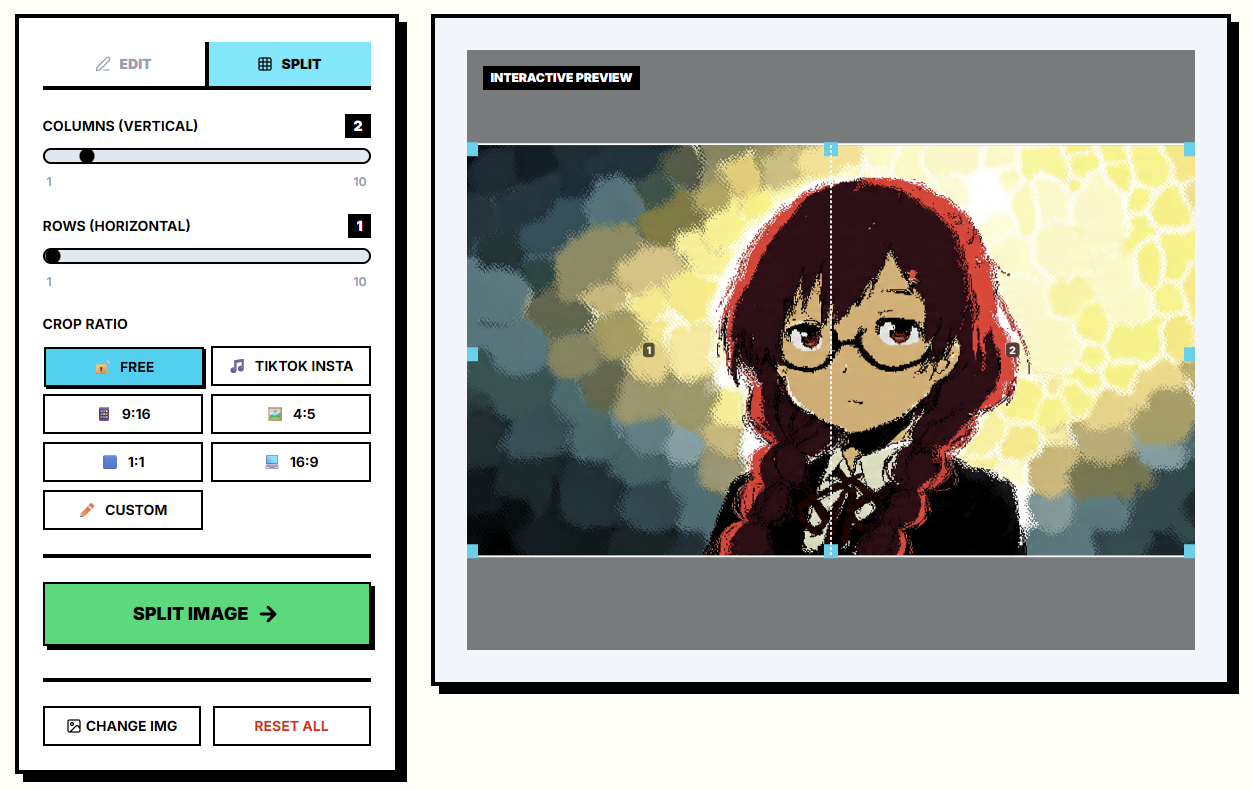
To create a horizontal slide effect, we need to split the original image vertically into equal parts.
- Columns (Vertical): Choose 2 (split in half) or 3 (split in thirds) depending on length.
- Rows (Horizontal): Choose 1 (Default).
Then click the green SPLIT IMAGE button.
3Download Images
The result will appear below. Download each part one by one:
Part 1 (Left Image)
Part 2 (Right Image)
4Post to TikTok (Photo Mode)
Open TikTok and select Photo Mode:
- Select images in correct order: Part 1 first, Part 2 second.
- When previewing, swipe left. You'll see the two images seamlessly connected like one long painting!